Categories
WeaKnees News

HD Coming soon to Amazon Unbox

An interview with Jim Denney of TiVo has a quote by Denney stating that Amazon Unbox will be available in HD “in the not too distant future.” That would be nice! So far, I’ve been using my AppleTV for better quality than my TiVo for online downloads. Frankly, while there are many advantages to the AppleTV, I’d rather use my TiVo just because I prefer the TiVo remote. So HD would bring me back over for downloads.

But I’m still pleading to all three companies (Apple, TiVo, and Amazon – even though it’s really not the fault of any of you three): please, PLEASE lengthen the 24 hour viewing window for rented video. It’s just not long enough, and it’s keep me and many others from renting more movies.
Categories
TiVo News

TiVo AOL – the Deal that Never Made It

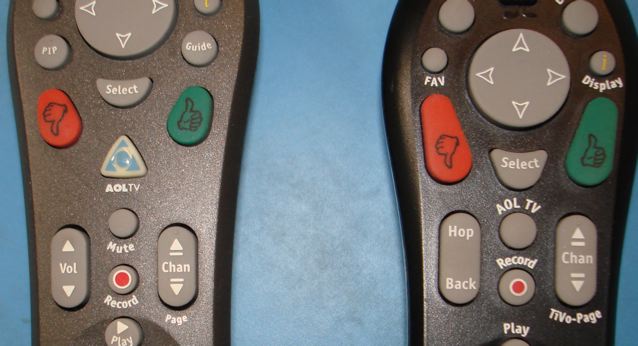
I have to confess that I didn’t remember seeing this one ever – and I’ve been working with TiVos for many, many years now. I was digging through some old boxes and I turned up these remotes with AOLTV buttons:

So I did some searches and found this link to an old story about a partnership that never blossomed.

I’m still not sure how you would change the volume with that remote on the right, but it seems ideal for Simon Says.

Categories
WeaKnees News

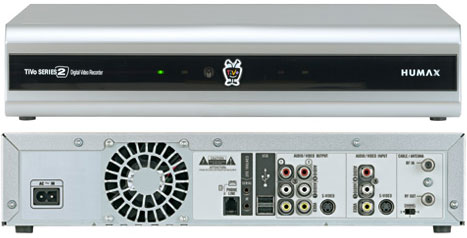
Humax T2500s In Stock

Sound like a bit of a blast from the past? Yup, that’s right. The Humax T2500.

This is definitely a bit of an older unit, but it’s a pretty good one, and it’s pretty cheap. We’re selling them at $99 as our “deal of the day” today, and likely for a few days.

Just to be clear, this is a standard definition, analog unit (it has no digital tuner – for more on that see our blog post about the digital transition), with no internal DirecTV tuner. Further, many people associate Humax with the DVD burner units – we have those, too, but this isn’t one of them. This unit is basically a TCD540040 clone, branded by Humax, with a much larger capacity.

So that said, why would you want one of these? Lots of reasons:

  • Perfect for a second room or bedroom without HD
  • Great gateway from your computer to your home entertainment system, since it supports networking
  • Large capacity for use to access shows from other units over Multi Room Viewing
  • Low price – no rebate involved! $99
  • Finally, we expect that many will buy these for parts, since they have a new remote, power supply, hard drive, and cables. If you need maybe two of those parts, the rest is free.
Categories
WeaKnees News

More TiVo Power Supplies Available

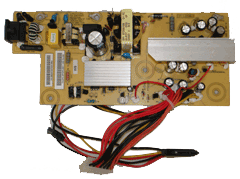
We’ve just added three more models to our TiVo power supply page. Amazingly, we now sell fourteen (14!) different models of power supplies for TiVos alone. Yes, we’re packed in to the gills over here.

The ones we just added are for:


  • Dual Tuner TiVos (TCD649080 and TCD649180)
  • TiVo Series3 (the original HD TiVo)
  • TiVo HD (the second HD TiVo)


Categories
DirecTV Troubleshooting Help

DIRECTV TiVo Tuner Problems

As DIRECTV TiVos age, we are seeing more problems with satellite tuners. I thought it would be helpful to summarize some of the more frequent symptoms of a bad DirecTiVo satellite tuner. (Also see our TiVo troubleshooting page.) Here are some of the more common symptoms associated with a defective satellite tuner (you need not have all of these symptoms to have a bad tuner):

  1. “Searching for Signal on Satellite 1” or “Searching for Signal on Satellite 2” message appears on your screen. Sometimes, this message appears constantly; other times it appears and disappears.
  2. Some of your recordings record; others don’t, especially when you have two programs set to record at the same time.
  3. If you conduct a satellite test, you see one or both of your satellites without any signal strength on all transponders. (To conduct a test, go to Messages and Settings > Settings > Satellite > Test Satellite Signal Strength > Ok; then cycle through the various transponders and satellites. Note that even fully functional units do not get a signal on every transponder, but your SAT 1 and SAT 2 signal strengths should be the same.)
  4. If you conduct a satellite test, you see the satellite signal strength on one of your tuners jump up and down, or you see one of the satellites significantly lower than the other. (To conduct a test, go to Messages and Settings > Settings > Satellite > Test Satellite Signal Strength > Ok; then cycle through the various transponders and satellites. Note that you won’t necessarily get signal on every transponder.)
  5. You see heavy and significant pixellation (blocky picture) on one or both of your satellite tuners. This could be a drive or a bad tuner, and we previously wrote about ways to diagnose the source of a pixellating DIRECTV TiVo. If you rewind, the pixellation is in the same place repeatedly.
  6. You see consistent, heavy pixellation on certain satellite channels, but not all of them.

If you are unsure whether you have a bad tuner, here are some tests you can conduct to help troubleshoot:

  1. If you are running two tuners and only one of your tuners is bad, try swapping cables in the back. Put the SAT 1 cable in the SAT 2 port, and vice versa. If the problem follows the cable (i.e., if the bad tuner was SAT 1 but after swapping cables is SAT 2), then you know you have a dish problem and not a satellite problem.
  2. If you are running two tuners and the bad tuner seems to be SAT 2, then you should be able to repeat satellite setup (Messages and Settings > Settings > Satellite > Repeat Satellite Setup) and specify that you have only one tuner. After doing that, your unit should work fine, but with only one tuner. If it does, then you know you have a bad SAT 2 tuner.
  3. If you have heavy pixellation on one tuner, then you can pause a pixellating channel and switch tuners (down on the circular directional arrow pad) and confirm that the pixellation disappears. If it does, then you have a bad tuner.

If you have determined that you do indeed have a defective tuner, then you have a few options: (1) You can abandon the TiVo and upgrade to high definition using one of DIRECTV’s non-TiVo DVRs. (2) You can send in your TiVo for a TiVo tuner repair. (3) If you have a bad SAT 2 only, then you can run with only SAT 1. (4) You can get a replacement DIRECTV TiVo (while supplies last).